 Hexium
Stand-alone and client-side. It needs nothing but BepInExPack Valheim, and nothing has to be installed on the server. It works well with Advanced Backpack and SortByQoL.
Samodzielny, po stronie klienta. Potrzebuje tylko BepInExPack Valheim, na serwerze nie trzeba nic instalować. Działa dobrze z Advanced Backpack i SortByQoL.
Not compatible with Extra Slots: both draw their panel in the same place and change the same code of the game. Remove one of them. BETA: bugs may still occur, report them on the Discord with the file from hypno report.
Niezgodny z Extra Slots: oba rysują panel w tym samym miejscu i zmieniają ten sam kod gry. Usuń jeden z nich. BETA: mogą zdarzyć się błędy, zgłaszaj je na Discordzie z plikiem z hypno report.
What it doesCo robi
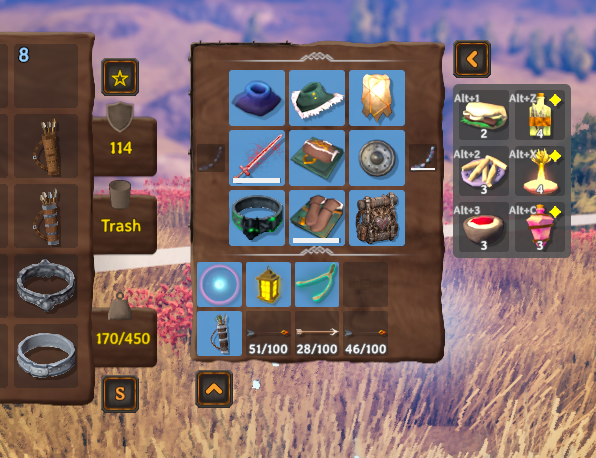
Everything you wear and keep at hand lives in one panel to the right of the inventory. What you wear takes no place in the inventory grid, so you have more room for loot.
- Equipment: helmet, cape, chest, legs, trinket, utility item, both hands and the backpack. Click an item to pick it up, right click to take it off, drop an item on a cell to wear it. An empty cell shows what belongs in it.
- Two hand sets: keep two sets at the same time (a weapon with a shield, a two-handed weapon, a bow alone): set 1 in the big hand cells, set 2 in the small icons beside them.
- One key handles both sets. It draws the selected set, and pressed again while a set is in your hands, the other one. The default key is
Y; hotbar slot 1 does the same (its icon shows both sets, and so do the mouse wheel and the pad). - Sheathe with
Ras usual and draw withRagain: the whole set comes back, the weapon and the shield. - A set the game sheathed for you (swimming, for example) comes out again with the same key.
- A set whose weapons are all broken is skipped for the other one.
- Drawing takes the weapon's equip time, like a weapon change in the game, and a hotbar tool (a pickaxe) never disturbs the sets.
- One key handles both sets. It draws the selected set, and pressed again while a set is in your hands, the other one. The default key is
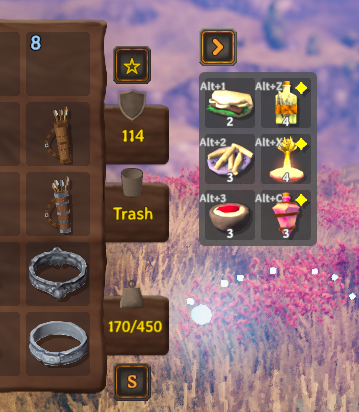
- Food and potions: 3 food cells and 3 potion cells, each with its own key (default
Alt+1/2/3andAlt+Z/X/C). They are shown on the HUD to the right of the health bar, in the look of the game's own food slots, with the count and the key. Food, potions, arrows and bolts you pick up go straight to their cells. - Belts (3): Iron, Silver and Black Metal Belt, crafted at a workbench, with 2, 3 and 4 accessory cells for trinkets, utility items and keys. Accessories keep their effect, and keys open doors while they lie in the belt.
- Quivers (3): Basic 2x100, Enhanced 3x100 and Superior 3x100 arrows or bolts; the ammunition in the Superior Quiver weighs half. The arrows in the quiver are used first.
- Backpack slot: with Advanced Backpack (or Children of the Ancient Heart) a backpack cell appears under the left hand, so a backpack and a utility item such as the wishbone are worn at the same time.
- Lantern on the belt: a Dvergr lantern put in the belt hangs on your hip and lights the way, lit all the time (the config can limit it to the dark: night, indoors and the Mistlands).
- Durability and grave: every cell shows the game's durability bar, and repair (also with SortByQoL) reaches the cells too. What lies in the cells goes into your grave and back into its cells when you take everything from it; what you wore is put on again.
Wszystko, co nosisz i trzymasz pod ręką, jest w jednym panelu po prawej stronie plecaka. To, co masz na sobie, nie zajmuje miejsca w siatce ekwipunku, więc masz więcej miejsca na łupy.
- Ekwipunek: hełm, peleryna, napierśnik, nogawice, trinket, przedmiot użytkowy, obie ręce i plecak. Kliknij przedmiot, żeby go podnieść, prawy przycisk zdejmuje, upuszczenie na komórce zakłada. Pusta komórka pokazuje, co do niej należy.
- Dwa zestawy do rąk: trzymaj dwa zestawy naraz (broń z tarczą, broń dwuręczna, sam łuk): zestaw 1 w dużych komórkach rąk, zestaw 2 w małych ikonach obok.
- Jeden klawisz obsługuje oba zestawy. Wyciąga wybrany zestaw, a wciśnięty ponownie, gdy zestaw jest w rękach, wyciąga drugi. Domyślnie
Y; slot 1 paska robi to samo (jego ikona pokazuje oba zestawy, tak samo rolka myszy i pad). - Chowanie klawiszem
Rjak zwykle i ponowneRwyciąga cały zestaw: broń i tarczę. - Zestaw schowany przez grę (np. przy pływaniu) wraca tym samym klawiszem.
- Zestaw, w którym wszystkie bronie są zepsute, jest pomijany na rzecz drugiego.
- Wyciąganie trwa tyle, co zmiana broni w grze, a narzędzie z paska (kilof) nigdy nie psuje zestawów.
- Jeden klawisz obsługuje oba zestawy. Wyciąga wybrany zestaw, a wciśnięty ponownie, gdy zestaw jest w rękach, wyciąga drugi. Domyślnie
- Jedzenie i potiony: 3 komórki jedzenia i 3 komórki potionów, każda z własnym klawiszem (domyślnie
Alt+1/2/3iAlt+Z/X/C). Widać je na HUD po prawej stronie paska zdrowia, w wyglądzie slotów jedzenia z gry, z liczbą i klawiszem. Jedzenie, potiony, strzały i bełty z ziemi trafiają prosto do swoich komórek. - Pasy (3): Iron, Silver i Black Metal Belt, robione w warsztacie, z 2, 3 i 4 komórkami na akcesoria: trinkety, przedmioty użytkowe i klucze. Akcesoria zachowują efekt, a klucze otwierają drzwi, gdy leżą w pasie.
- Kołczany (3): Basic 2x100, Enhanced 3x100 i Superior 3x100 strzał lub bełtów; amunicja w Superior Quiver waży o połowę mniej. Strzały z kołczana są używane jako pierwsze.
- Miejsce na plecak: z Advanced Backpack (lub Children of the Ancient Heart) pod lewą ręką pojawia się komórka plecaka, więc plecak i przedmiot użytkowy, np. wishbone, nosisz jednocześnie.
- Latarnia przy pasie: latarnia Dvergrów włożona do pasa wisi na biodrze i świeci, cały czas (w configu można ograniczyć do ciemności: noc, wnętrza i Mistlands).
- Wytrzymałość i grób: każda komórka pokazuje pasek wytrzymałości z gry, a naprawa (także z SortByQoL) obejmuje też komórki. Co leży w komórkach, trafia do grobu, a po zabraniu wszystkiego wraca na miejsce; to, co miałeś na sobie, jest zakładane ponownie.
ScreenshotsZrzuty ekranu
InstallationInstalacja
Requirement: BepInExPack Valheim.
With r2modman find AdvancedEquipment_2_EQ_Sets, choose Download with dependencies and Start modded. Manual install: put AdvancedEquipment.dll into Valheim/BepInEx/plugins/.
All keys, the position of the HUD bar and the lantern are set in BepInEx/config/p0kahontazz.advancedequipment.cfg (sections Hotkeys, Hud, Lantern, Pickup). If you remove the mod while wearing gear, take the gear off first.
Wymaganie: BepInExPack Valheim.
W r2modman znajdź AdvancedEquipment_2_EQ_Sets, wybierz Download with dependencies i Start modded. Ręcznie: wrzuć AdvancedEquipment.dll do Valheim/BepInEx/plugins/.
Wszystkie klawisze, położenie paska na HUD i latarnię ustawisz w BepInEx/config/p0kahontazz.advancedequipment.cfg (sekcje Hotkeys, Hud, Lantern, Pickup). Jeśli usuwasz mod, mając coś na sobie, najpierw zdejmij ekwipunek.
Also by Hypnogoogic: Advanced Backpack, SortByQoL and ImmersiveTrader, traders, contracts, quests, dungeons, armour sets and ship upgrades.
Także od Hypnogoogic: Advanced Backpack, SortByQoL i ImmersiveTrader, handlarze, kontrakty, zadania, lochy, zestawy pancerza i ulepszenia statków.
AdvertisementReklama